
Device Orchestra – Sweet Dreams
An evening pause: Another clever musical repurposing of household electronic gear.
Hat tip Mike Nelson.
An evening pause: Another clever musical repurposing of household electronic gear.
Hat tip Mike Nelson.
An evening pause: You need to watch this to believe it.
Hat tip Bill Heinz.
My regular readers know about my utter contempt for Microsoft and its terrible Windows operating system. Any company that treats its customers like dirt, as Microsoft routinely does, does not deserve the business of anyone. I realized this reality two decades ago, and successfully switched to Linux back in 2006. I have never regretted it.
Moreover, the increasingly intolerant behavior of big tech companies like Microsoft to free speech increases the need for people to free themselves from them. The willingness of these companies to also treat your privacy and personal data as a plaything for their use, without your permission, is another rational reason to stop depending on them.
Linux accomplishes this, in that its open source software structure is really controlled by no one. There is also no software company using the operating system to gather your data for its own purposes.
In 2016, after seeing a number of my posts noting the advantages of Linux (or anything) over Windows, one of my readers, James Stephens, offered to write a series for Behind the Black describing step-by-step the process by which one gets and installs Linux on either a desktop or laptop computer. Below are the links to this series. I have since used it myself as a guide to convert two used Windows 7 notebooks (purchased for $35 and $80) to my favorite flavor of Linux, both of which I use regularly as my travel computers.
I wish more people would do the same, which is why I am reposting the links to this series again. Though six years have passed, James instructions still apply perfectly, as I can attest as I used this series to convert the second laptop only a year ago. Nonetheless, James has added an addendum to Part 2, which brings the entire series up to date.
I am sure almost everyone has an old computer they don’t use anymore. It will work like new with Linux. Dig it out, follow James’ instructions below and free yourself from Windows. I guarantee you will not be disappointed.
The tenth anniversary retrospective of Behind the Black continues: My contempt for Microsoft and its terrible Windows operating system is quite well known. I successfully switched to Linux back in 2006 and have never regretted it.
After seeing a number of my posts noting the advantages of Linux (or anything) over Windows, one of my readers, James Stephens, offered to write a series for Behind the Black describing step-by-step the process by which one gets and installs Linux on either a desktop or laptop computer. Below are the links to this series. I have since used it myself as a guide to convert two used Windows 7 notebooks (purchased for about $35 each) to my favorite flavor of Linux, both of which I use regularly as my travel computers.
I wish more people would do the same. I am sure almost everyone has an old computer they don’t use anymore. It will work like new with Linux. Dig it out, follow James’ instructions, and free yourself from Windows. I guarantee you will not be disappointed.
An evening pause: This is a bit long for an evening pause, and I myself did not understand a good portion of the terminology, but it is still fascinating and worth watching nonetheless, if only to give you hope for the future. As the last questioner at the end said, “I think you’ve raised the bar on what all of us should expect from our kids now.”
Hat tip Diane Wilson.
An evening pause: A quick review, with images, of the Computer History Museum in Mountain View, California. Like them, I was tickled by the gigantic scale of technological improvement that took place in this field in such a relatively short time.
Hat tip Ben K.
Link here. The introduction:
A short list of the most transformative products of the past century and a half would include the lightbulb, Ford’s Model T—and the IBM System/360. This mainframe series forever changed the computer industry and revolutionized how businesses and governments worked, enhancing productivity and making countless new tasks possible.
In the years leading up to its 7 April 1964 launch, however, the 360 was one of the scariest dramas in American business. It took a nearly fanatical commitment at all levels of IBM to bring forth this remarkable collection of machines and software. While the technological innovations that went into the S/360 were important, how they were created and deployed bordered on disaster. The company experienced what science policy expert Keith Pavitt called “tribal warfare”: people clashing and collaborating in a rapidly growing company with unstable, and in some instances unknown, technologies, as uncertainty and ambiguity dogged all the protagonists.
Ultimately, IBM was big and diverse enough in talent, staffing, financing, and materiel to succeed. In an almost entrepreneurial fashion, it took advantage of emerging technologies, no matter where they were located within the enterprise. In hindsight, it seemed a sloppy and ill-advised endeavor, chaotic in execution and yet brilliantly successful. We live in an age that celebrates innovation, so examining cases of how innovation is done can only illuminate our understanding of the process.
Read it all. The story is fascinating, especially in how intellectual honesty made it a success. In one case two computer managers were competing directly against each other for the lead in how the product would be developed. The man that was picked immediately asked the loser to help him build his proposal, a level of honesty that certainly made this company work in the 1960s.
The story also has one bit of real irony. The 360 was a big success because it was compatible with IBM’s previous computer line, and was designed to be compatible across the board.
In the 1980s, IBM lost its entire dominance in the personal computer field when it introduced its second generation PC, the PS/2, which was NOT compatible with their first PC line. Customers fled to independent companies making computers compatible to IBMs first PC, and this loss of business ended up killing IBM entirely.
You would have thought they would have known better.
Hat tip Thomas Biggar.
An evening pause: A little dense for non-engineers, but just clear enough to be educational for all.
Hat tip Edward Thelen.
As always, I am in need of suggestions for evening pauses. If you’ve seen something you think will fit, place a comment here, in this post, but don’t post a link to your suggestions. I will contact you so that you can send it to me direct and I can then schedule it.
Another reason I use Linux: A survey of computer security experts confirms that they generally consider Linux superior to either the Windows or Apple operating systems when it comes to security.
Obviously, if you are used to Windows or Apple, making the switch seems daunting. It isn’t, as I know from experience, having been a Linux user now for almost a dozen years. And if you want to try out Linux, all you really need is a spare laptop or desktop, one or two years old, that you aren’t using any more, and to then follow the instructions provided here on Behind the Black by reader James Stephens for Getting and Installing Linux:
Put a flavor of Linux on that old computer, and begin playing with it. Before long you will find that you don’t need Microsoft or Apple anymore.
An evening pause: Everything about this gives me the creeps.
Hat tip Edward Thelen.
New computer software is making it possible for computers to quickly analyze the data provided by surveillance cameras, which in turn will allow businesses and government to track and identify city dwellers all the time.
Through partner businesses, Nvidia’s technology is set to take things even further, enabling autonomous aerial systems streaming video back from the sky, security robots driving themselves around looking for trouble spots, and ultra high resolution, super-wide panoramic cameras that capture a whole scene instead of needing to track and follow objects.
And instead of just recording and storing footage, every camera’s output would be constantly analyzed and crunched into useful data points. We’re talking facial recognition, vehicle recognition, and pattern tracking in road and pedestrian traffic.
Clearly this will be useful in a law enforcement and security sense, and several Nvidia partners are working along these lines. BriefCam, for example, is demonstrating technology that tracks individuals and vehicles through security footage, then produces super-quick review videos in which all events in a given time frame can be made to happen in a condensed format where a bunch of them are on screen at once.
It seems to me that this new technology fits very well with the urban leftist culture that runs most American cities these days. These fascist communities, run almost exclusively by Democrats, will cheer this surveillance as a way to protect themselves from bad things, including people with opinions they don’t like. Consider how useful this would have been to Berkeley, for instance, during its recent struggle to keep conservative speakers out of town.
Why I use Linux, part 5,234,657: Microsoft is now inserting advertisements for its software throughout its Windows 10 operating system.
Microsoft has taken the next step in pushing advertising on customers of its Windows 10 operating system, with users reporting an advertisement for Microsoft OneDrive now appearing in their File Explorer.
Windows 10 has been repeatedly reprimanded by technology journalists over the past year for the increasing amounts of advertising that are baked into the system. Advertisements in various forms have appeared in the Start menu, the lock screen, the taskbar, in the Windows Store, and various other areas. This seems to be the first time that users are noticing them in the File Explorer, the application that allows users to look through their documents and applications on their computer.
As I have been saying for years, dump Windows. It invades your privacy, provides you bad service while crashing at the worst possible moments. There are alternatives. I have been using Linux now for more than a decade, and it hasn’t held me back. Here again are the links to James Stephens’ series on Behind the Black for Getting and Installing Linux:
An evening pause: I’m not sure if his concept for a different way to interact with the computer is really the best way to do it, but his willingness to try something new makes it all worthwhile. There will — and have been — payoffs.
Hat tip Edward Thelen.
Yesterday while I was sitting at my desk working on my Linux desktop computer, I got a phone call from someone from “Windows Technical Support.” The man on the line said to me, quite nicely, that they had noticed a problem with my computer and wanted to help me fix it.
I said, “You are talking about my Windows desktop computer, the one I am working right now, correct?”
The man said sweetly, “Yes, sir. That’s the computer we have seen a problem with.”
I answered sweetly, “I just want to be sure, so let me ask again. You are referring to the Windows computer in front of me, the one on my desk?”
He responded, “Yes sir. Could you press your start menu please and go to settings?”
Unfortunately, I had too much work to do, and couldn’t spend more time with him. I would have liked to have led him along for as long as possible, but simple didn’t have the time. Instead, I said, “Um, I can’t really go to my Windows settings because my desktop is a Linux computer, and has been for a decade. Have you heard of Linux?”
Instantly the phone went dead.
I tell this tale because it is only one more reason I abandoned Windows back in 2006. With Linux I have no viruses to worry about, and scammers like this can’t do me any harm.
Anyway, this post really isn’t about Windows scammers. Instead, I want to relate my experience this past week in setting up my first Linux laptop, following the step-by-step instructions provided by James Stephens and posted here on Behind the Black last year in the following series:
» Read more
An evening pause: For the New Year, this short film epitomizes the modern computer world. Do you use an iDiot?
Hat tip Jim Mallamace.
Link here. I suspect that most of my readers will be able to guess what computer we are talking about, and even where it is located.
Engineers have restored the first recording of computer-generated music from 1951.
The oldest recording of computer music was made in late 1951 by a BBC outside broadcast unit at the University of Manchester for the BBC Home Service program Children’s Hour. The rough two-minute recording is of the Ferranti Mark I computer playing “God Save the King”, “Baa Baa Black Sheep”, and the popular swing-band hit “In the Mood.” The recording was made on mobile recording equipment and etched into a 12-inch, single-sided acetate disc, as was normal for the time.
The restoration determined that the record, one of only two in existence, played the music at the wrong speed. To make it sound correct, “it had to be sped up, extraneous noise filtered out, and digitally pitch-corrected to remove wobbles.”
You should definitely listen to it. Quite fascinating, especially since it includes the candid commentary of the technicians as they tried to get the computer to play.
Why I use Linux, part 3,332,468: A consumer organization is calling for Microsoft to compensate people for the hardware damage caused by upgrades to Windows 10.
Microsoft needs to pay compensation to customers who have suffered after upgrading to its latest operating system, consumer watchdog Which? has urged. Since the US technology firm pushed out the new software last year, it has been flooded with complaints. Customers who moved to Windows 10 experienced a slew of issues, including printers, webcams, wifi cards and speakers no longer working with their PC. Instances of lost files and email accounts no longer syncing, and, most significantly, computer encountering such significant issues customers had to pay someone to repair it were not uncommon, Which? has reported.
The consumer group surveyed views on the upgrade from over 5,500 members in June this year. Of the 2,500 users who had been upgraded to Windows 10 from an older version of Windows, more than one in ten ended up rolling back to their previous version of the operating system.
For once, this post is not a link to another Windows horror story. Instead, it is a link to a great deal to buy CrossOver 15, the professional version of Wine that allows you to run Windows software on Linux or Apple computers. Normally CrossOver costs $59.99. This deal sells it for $19.99. And the sale ends in one day!
So, if you were thinking of trying Linux but were hesitating because you were unsure about whether you could run Windows software on it, this helps solve the problem. CrossOver does what WINE does, but with full telephone support.
I must add one more thing for full disclosure: If you buy it through the link above, you will also help support Behind the Black, as I will get a credit for the referral. I’m doing this not for that credit but because I think this is definitely a good deal. However, why not get the referral at the same time?
Note that the link above doesn’t take you directly to the CrossOver 15 deal. Click on Categories, then Software. You will see the CrossOver deal link in the second row.
by James Stephens
Today I will be installing Windows on VirtualBox. VirtualBox allows me to easily install and run Windows on my Linux computer without having to partition, format or otherwise disturb my hard drive. Once installed booting into the Windows guest is easy, just open VirtualBox and select Windows and hit start. Given the fact a virtual machine shares hardware resources with it’s host, generally a 64 bit host operating system can only host a 32bit guest operating system. Windows in most cases is still a 32 bit operating system.
First of all I will download VirtualBox via the my distribution’s Software Manager. Once it’s installed you will usually find its shortcut under Applications/System/Oracle VM VirtualBox in your application launcher. Click on it and VirtualBox will open to its Welcome massage. To create a virtual machine, in this case Windows, choose “new” in the VirtualBox tool bar.
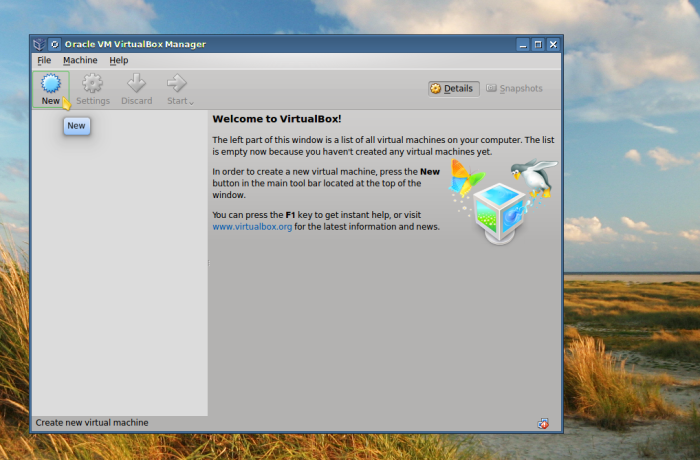
The create virtual machine dialogue will appear where you will give the guest operating system a descriptive name and select its type and version, such as Windows XP.
» Read more